
Kingdom Rush 6 Genesis TD Genesis TD Controls
Pointer first, then portraits, then pause. Controller is extra, not the core.
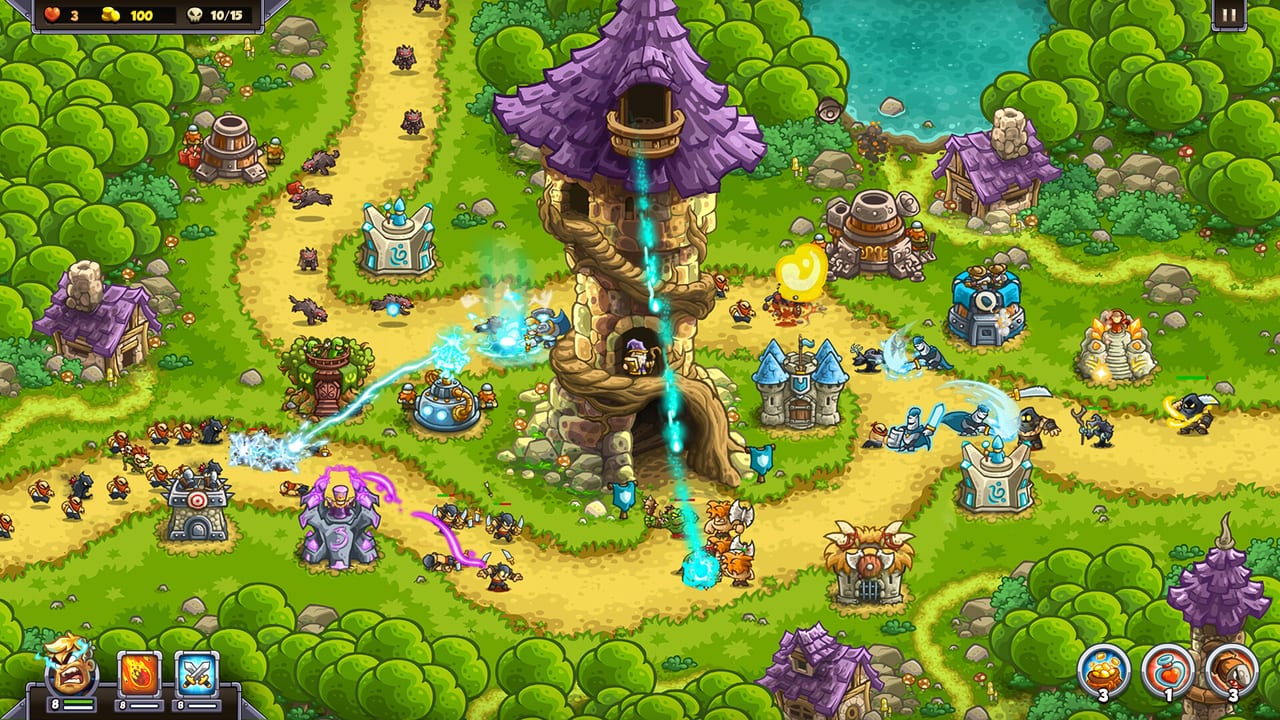
Kingdom Rush 6: Genesis TD is a pointer game. Steam lists mouse-only as an accessibility option and partial controller support (including Xbox controllers), plus custom volume and adjustable difficulty. Mobile uses the series’ tap-to-move language. This page is the input cheat sheet that the beginner guide was too crowded to hold.
PC and Mac (Steam)
- Select a tower spot — click an empty flag or pad, choose a tower family.
- Upgrade / skill — click the tower, click the node or star button. Genesis adds per-tower trees, so this is not only “pay gold for tier 2.”
- Rally barracks — click the barracks, click a point on the path. Soldiers walk there. If they stand in a decorative garden, you rallied wrong.
- Move a hero — click the hero model or the portrait in the HUD, then click a legal point on the path. Most heroes cannot stand in scenery; they path around it. Flying heroes are the exception, which is why the two-hero system likes a flying Rover on disconnected lanes.
- Spells — click the spell slot, click the ground. Reinforcements need a path. Rain of Fire needs a cluster, not a single goblin.
- Pause — use it. Genesis is not a reflex shooter. The Western Wall Veteran videos that last 40 minutes pause a lot.
Steam’s own accessibility line items: adjustable difficulty, custom volume, mouse-only option. If a pad feels clumsy for dual-hero micro, that is expected. Play mouse.
Mobile (iOS and Android)
Pre-order pages on the App Store and Google Play point at the same 24 September 2026 launch. Input is:
- Tap empty pad → tower menu.
- Tap tower → upgrade / sell / rally.
- Tap hero or portrait → tap path.
- Tap spell → tap target.
Fat-finger rule: zoom enough to see rally flags. Dual heroes make mis-taps expensive; you will move Gerald when you meant Zefira. The HUD portraits in screenshots sit in the lower left — train yourself to tap portraits, not models, when the lane is busy.
HUD literacy
Top-left typically shows lives, gold, and wave count (for example 9/10). Bottom-left shows the two hero portraits with small resource or cooldown pips, then three spell slots. Top-right is pause. That layout is already in the Steam screenshots on this wiki.
Between stages, the world map bottom bar is Heroes, Towers, Spells, Upgrades, Achievements, Encyclopedia. That is where you change the pair, read Royal Catapult IV in the book, and spend stars on the four-column board. The upgrade planner is about that board, not about in-stage clicking.
Two-hero input discipline
The extra hero doubles misclick rate.
- Move the Rover with portraits, not by hunting the tiny model in VFX.
- Move the Anchor less often. Gerald’s job is a door, not a tour.
- After a spell, check which portrait is selected. Spells should not steal your hero selection for the next five seconds of panic.
- If you use a controller, bind portraits to bumpers if the game allows it; otherwise accept that dual-hero Iron on a pad is a challenge run.
What not to bind your identity to
There is no hidden keyboard RTS layer announced. Do not wait for a full hotkey grid like a competitive RTS. Pause, click, rally, spell. The campaign stages care about where the click landed, not about your APM.
Accessibility and difficulty
Adjustable difficulty is on the Steam store page. Use it to learn a map, then step back up before you claim an Iron clear. Mouse-only is there for a reason: you can play without a keyboard. Color and volume are separate from the tower-level rework; if a post-demo UI change confuses you, read devlogs rather than fighting the HUD.
Launch-day setup
Before 24 September 2026, decide the device. Steam wants a mouse and 4 GB RAM per the system requirements. Mobile wants a thumb that can hit portraits. If you plan to stream or screenshot, pause exists — the game is built for it.
Controls are not a skill tree. They are a way to stop moving both heroes into the same bush. Once that stops happening, go back to Iron mode and Classic Mode where the real constraints live.
Frequently Asked Questions
Quick answers to the most common Kingdom Rush 6: Genesis TD questions.
Does Kingdom Rush 6: Genesis TD support a controller?
Steam lists partial controller support, including Xbox. Dual-hero play is still easier with a mouse.
How do I move heroes on PC?
Click the hero or the HUD portrait, then click a point on the path. Flying heroes can ignore some terrain.
Is there a mouse-only option?
Yes. Steam lists a mouse-only accessibility option plus custom volume and adjustable difficulty.